|
Making Changes
Progressively increasing difficulty in gameplay is a hallmark of game design in many different genres. For the Asteroids game, it is no different. The basic Spawn Area behavior is a good start but in its current state the one time spawning of large asteroids makes the game either too easy if a low number is chosen or too hard if a large number are spawned. The following changes to the Spawn Area behavior will implement a waved progression of asteroid spawns. This will allow us to slowly increase the number of asteroids spawned in each wave plus it gives the game some structure and allows the player to measure his or her progress though the total number of waves or "levels" completed.
Start by opening up spawnArea.cs in your Behaviors folder. Begin by editing the behavior template add the following behavior field:
%template.addBehaviorField(addOnRespawn, "The number of objects to add in each wave of respawns", int, 1);
Now change the onAddToScene function to this:
function SpawnAreaBehavior::onAddToScene(%this, %scenegraph)
{
   %this.asteroidsCount = 0;
   %this.spawnCount = 0;
   %this.schedule(%this.spawnTime * 100, "spawn");
}
Finally, add the following function to the end of the file:
function SpawnAreaBehavior::update(%this, %object)
{
   %this.asteroidsRemoved = %this.asteroidsRemoved + 1;
   %totalSpawns = %object.spawnOnRemoveCount * %this.count;

   if (%this.asteroidsRemoved == %totalSpawns)
   {
      %this.asteroidsRemoved = 0;
      %this.count = %this.count + %this.addOnRespawn;
      %this.spawnCount = 0;
      %this.schedule(%this.spawnTime * 1000, "spawn");
   }
}
This update function will compare the total number of small asteroid spawns (we don't need to count the large asteroids) to a counter variable. For this function to work, two more things have to be added: 1. The spawnOnRemoveCount from the object, 2. A behavior which will call this update function when small asteroids are destroyed.
Save the script and close it. The entire behavior script can be found here to check against: Click here.
Let's add the first thing. Open up spawnOnRemove.cs in your behaviors folder and add the following line
%newObject.spawnOnRemoveCount = %this.count;
to the spawnChildren function within the for loop. Save and close the file.
Now for the counter behavior. We've already added a specialized counter that keeps track of the score in section 3, so this type of behavior is hopefully a bit familiar. Create a new script file and call it:
spawnTracker.cs
//-----------------------------------------------------------------------------
// Torque Game Builder
// Copyright (C) GarageGames.com, Inc.
// Behavior by Mike Lilligreen for TDN Asteroids Tutorial
//-----------------------------------------------------------------------------

if (!isObject(SpawnTrackerBehavior))
{
   %template = new BehaviorTemplate(SpawnTrackerBehavior);

   %template.friendlyName = "Spawn Tracker";
   %template.behaviorType = "Game";
   %template.description  = "Tags object and reports scene removal to spawner";

   %template.addBehaviorField(spawner, "The spawn area object", object, "", t2dSceneObject);
}

function SpawnTrackerBehavior::onRemove(%this)
{
   %spawner = %this.spawner.getBehavior("SpawnAreaBehavior");
   if (!isObject(%spawner))
      return;

   %spawner.update(%this.owner);
}
Save it to your behaviors folder and start up TGB.
Updating Scene Objects
Inside your scene in TGB, click on the spawnMachine or whatever you named the scene object with the spawn area behavior. You should see now the new addOnRepawn field. Play around with the numbers as you wish, for the tutorial it's been kept at 10 initial asteroids with 2 new asteroids added in each wave.
Next, click on the small asteroid object. Add the Spawn Tracker behavior and set the spawner.
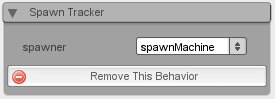
Save your scene and try the level out. As soon as you shoot the last small asteroid remaining from the initial wave, more large asteroids should spawn. There are other ways to increase the difficulty as well, inside the update function in spawnArea.cs you could reduce the spawnTime or spawnVariance numbers by a small amount for example.
With a way to ramp the difficulty up in this example game, the next section will again focus on the GUI - adding an object to inform the player of each incoming wave of asteroids.
Return to Asteroids Tutorial Hub
|