Torque 2D Tutorial – A 'moveTo' Function
by: Matthew "King BoB" Langley
edited by: Spider
Please be aware that as from the alpha-releases (v1.1.0 alpha+) you can achieve the same functionality with a single command! The SDK now contains an in-built ability to move/rotate to a specific position/rotation. Please see the reference guide for further information on the following commands...
- MoveTo()
- RotateTo()
- SetPositionTarget()
- SetPositionTargetOff()
- SetRotationTarget()
- SetRotationTargetOff()
This tutorial will cover
the following:
- Sprite movement
- T2D object movement functions: setRotation and setLinearVelocityPolar
- T2D schedule function for scheduling future function calls
- T2D dump function for displaying object member functions and variables
- Creating a moveTo function that makes an object move to a mouse click location, then stop
Note: This tutorial was written using the early release version of T2D, which has a default white background. To make your screenshots match those shown, open the SDK\Example\T2D\client\mainScreenGui.gui file and find/replace the text “logoblack†with “logowhiteâ€.
Note: Any time you do a tutorial or experiment with Torque 2D, it’s a good idea to copy your entire Torque2D directory and modify only the copy. That way your original files remain intact.
In this tutorial, like the others in this series, all script files are contained in (or are to be created in) the SDK/example/T2D/client folder. To set things up, let's make a couple changes in client.cs. Open it and find the end of your exec statements, like 'exec("./mainScreenGui.gui");' and after all the present ones add this:
exec("./exec.cs");
Scroll down a little and after these lines:
        // ************************************************************************
        //
        // Add your custom code here...
        //
        // ************************************************************************
add this:
OnStartUp();
Setting client.cs up this way allows us to exec all our scripts and GUI files in exec.cs so that we don't have to keep changing this T2D base file. Similarly any functions we need to run to set things up can be run in OnStartUp, which we're about to write. To contain that function, create a new script file called “onStartUp.cs†and enter the following code:
function OnStartUp()
{
        moveToDemo();
}
Now create another script file called “moveTo.csâ€. The way we're going about this may seem a little overly complicated, but it's just an example of one way to organize your files and functions. It's probably overkill for a project as small as this tutorial, but in any real project organizing your files and dividing your code is definitely worth your time. Not only is it easier to find and modify code, but in T2D syntax errors are often reported by file. Moving on, add the following function to moveTo.cs:
function moveToDemo()
{
        $player = new t2dStaticSprite() { scenegraph = t2dScene; };
        $player.setPosition("0 0");
        $player.setSize( "7 7" );
        $player.setImageMap( tileMapImageMap );
}
All that does is make a square sprite on the screen. Okay, one more script file before we give this a whirl. Create “exec.cs†and put this in it:
exec("./moveTo.cs");
exec("./onStartUp.cs");
Now save all your files and fire up T2D. You'll see this:
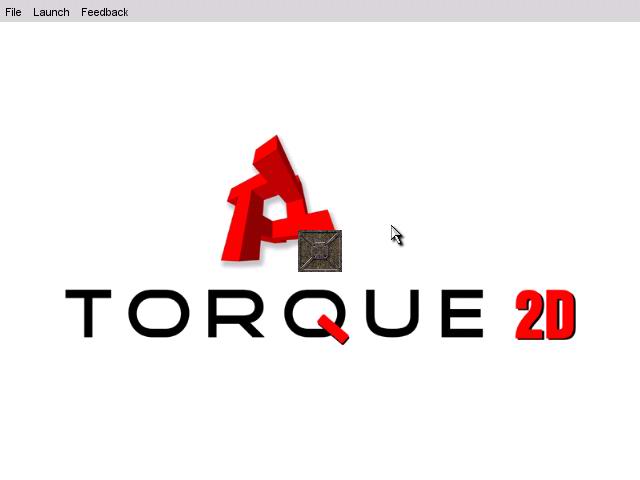
That's all our code should do, so far... make that box in the middle of the screen. If this isn't what you see, bring up the console and scroll back looking for red text (error messages) and doublecheck what you've done against the instructions above.
Okay, the basic setup is done. Time to move on to the meat of the tutorial... Add this function to moveTo.cs:
function t2dSceneObject::setDestination(%this, %dest)
{
}
By using the “::†operator, we make this function a part of the t2dSceneObject object, the basis of all T2D sprites, so that all objects that we create automatically inherit it. This means that, for example, later we can simply say '$player.moveToDestination(“5 5â€);'. Also, since this function is part of an object, the object will automatically be passed to it as the first parameter whenever it's called. So, in our '$player.moveToDestination(“5 5â€);' example, %this will receive $player and %dest will receive “5 5â€.
Cool. Let's add some inner workings:
function t2dSceneObject::setDestination(%this, %dest)
{
        if((%dest != 0) && (%dest !$= ""))
        {
                %this.Destination = %dest;
                %this.isMoving = true;
                if($debugMsg::pathDebug)
                        echo("calling move to dest with" SPC %dest);
                %this.schedule(50,moveToDest);
        }
}
Let's go through this step by step:
if((%dest != 0) && (%dest !$= ""))
This just makes sure %dest isn't empty.
%this.Destination = %dest;
Here, we create a Destination variable in the object and set it to %dest.
%this.isMoving = true;
This sets a flag in the object to tell it that it's moving, and that we'll set to false when it's reached its destination.
if($debugMsg::pathDebug)
        echo("calling move to dest with" SPC %dest);
Just a simple debug statement. You're familiar with this if you've done other tutorials in this series.
%this.schedule(50,moveToDest);
In the last line we have a schedule statement. If you haven't seen this before, the T2D schedule function is used to tell an object to perform a function at some later time. Here, we are telling the object to run its own moveToDest function in 50 milliseconds (1/20 th of a second). We use this small number so that there is only the slightest delay between setting the destination and moving toward it.
Time to test this little bit of code. Save your file and fire up T2D. For starters, bring up the console (by pressing “~†tilde) and turn on our debug messages by entering this command:
$debugMsg::pathDebug = true;
like this:
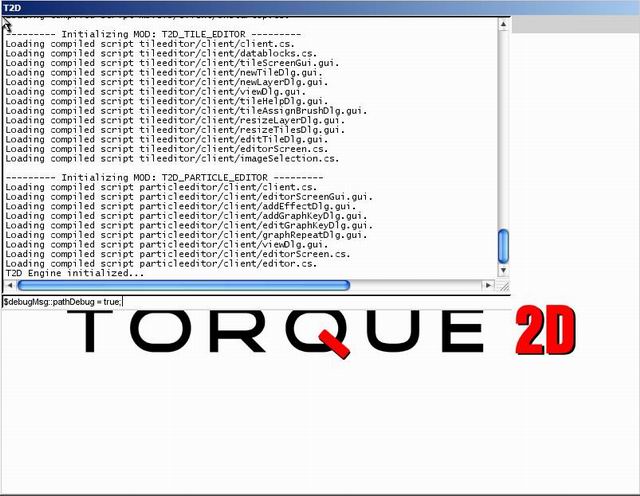
now enter this into the console:
$player.setDestination("15 15");
You should see the line echoed by our debug statement, like this:
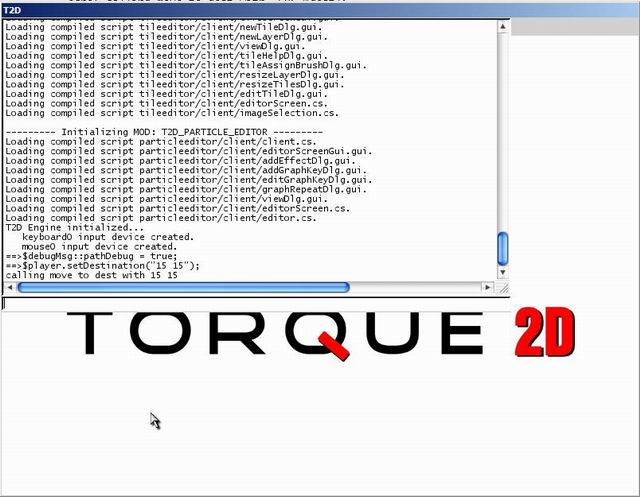
If you don't, compare your moveTo.cs code to this:
function moveToDemo()
{
        $player = new t2dStaticSprite() { scenegraph = t2dScene; };
        $player.setPosition("0 0");
        $player.setSize( "7 7" );
        $player.setImageMap( tileMapImageMap );
}

function fxSceneObject::setDestination(%this, %dest)
{
        if((%dest != 0) && (%dest !$= ""))
        {
                %this.Destination = %dest;
                %this.isMoving = true;
                if($debugMsg::pathDebug)
                        echo("calling move to dest with" SPC %dest);
                %this.schedule(50,moveToDest);
        }
}
Using the console is one way to check whether or code is working. Let's take a look at another way, using the extremely useful dump function. All objects in T2D can use the dump function, which displays every variable and function contained by the object. Let's give it a try... type the following command into the console:
$player.dump();
You'll see this:
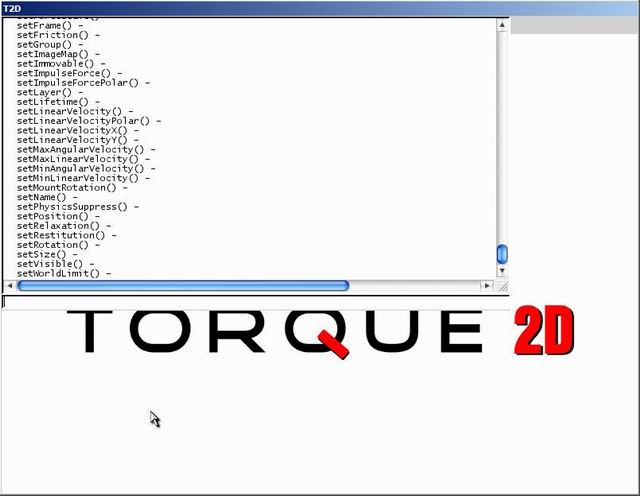
Scroll up a little until you see this:
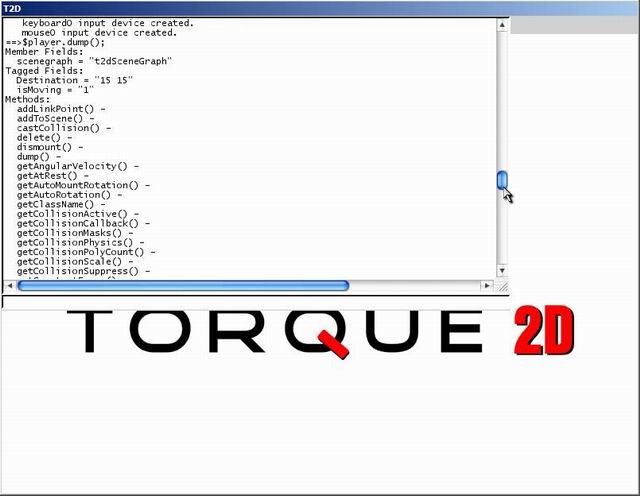
Here, in the “Tagged Fields:†section, you can see the destination variable that we set using our setDestination function. Pretty cool, right!?
Okay, before we move on to creating the moveToDest function, we're going to create a helper function to compute the angle between two positions. It uses the trigonometry functions mRadToDeg (radians to degrees) and Atan (arctangent) to do this. Add it to the end of moveTo.cs...
function angleBetween(%playerPos, %mousePos)
{
        // Seperate Mouse Position
        %mxpos = getWord(%mousePos,0);
        %mypos = getWord(%mousePos,1);

        // Seperate Player Position
        %px = getWord(%playerPos,0);
        %py = getWord(%playerPos,1);

        // Calculate Angle from player to mouse (convert to degrees).
        %angle = mRadToDeg( mAtan( %mxpos-%px, %py-%mypos ) );

        return %angle;
}
Cool, now it's time to make the moveToDest function that we scheduled earlier. Here it is:
function t2dSceneObject::moveToDest(%this)
{
        if(%this.isMoving)
        {

                %direc = angleBetween(%this.getPosition(), %this.Destination);
                %this.destRot = %direc;
                %this.setRotation(%direc);
                %this.setLinearVelocityPolar(%direc, %this.speed);

                %this.schedule(100, checkDest);
        }
}
Let's disect this code...
        if(%this.isMoving)
        {
First thing we do is check to make sure the object is moving. If it's not, we can skip the whole function.
%direc = angleBetween(%this.getPosition(), %this.Destination);
Here, we're storing the direction between where we are (getPosition returns that) and where we're going.
                %this.destRot = %direc;
                %this.setRotation(%direc);
This stores and sets our object's rotation. Note that this will change the rotation abruptly and may cause the collision and physics to slip if it happens at high speeds. For our demo it's fine, though.
%this.setLinearVelocityPolar(%direc, %this.speed);
Now we send the object moving in the direction we calculated, at its speed (which we'll set manually for now).
%this.schedule(100, checkDest);
The last thing we do is schedule the checkDest function, which will check if the object has reached its destination. Note that since the schedule is part of the t2dSceneObject, it uses the %this parameter and thus has a different schedule for each object.
Time to test this out! Fire T2D, bring up the console, and put in these commands:
$player.speed = 10;
$player.setDestination("15 15");
Close the console (quickly) and watch the box move. But wait! It doesn't stop!!!
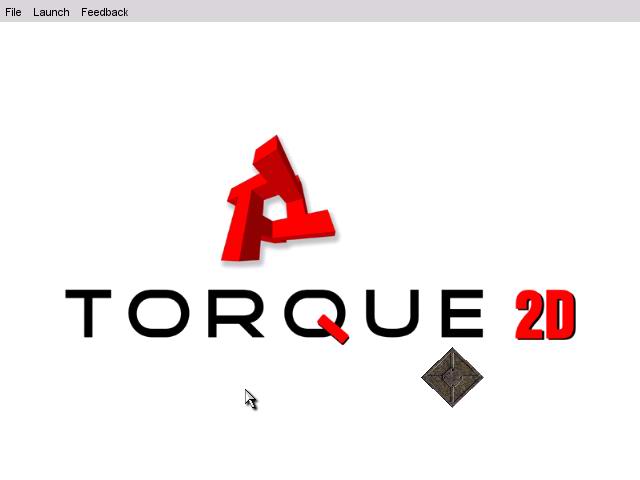
If yours doesnt work like this, then compare your code to this:
function moveToDemo()
{
        $player = new t2dStaticSprite() { scenegraph = t2dScene; };
        $player.setPosition("0 0");
        $player.setSize( "7 7" );
        $player.setImageMap( tileMapImageMap );
}

function t2dSceneObject::setDestination(%this, %dest)
{
        if((%dest != 0) && (%dest !$= ""))
        {
                %this.Destination = %dest;
                %this.isMoving = true;
                if($debugMsg::pathDebug)
                        echo("calling move to dest with" SPC %dest);
                %this.schedule(50,moveToDest);
        }
}

function angleBetween(%playerPos, %mousePos)
{
        // Seperate Mouse Position
        %mxpos = getWord(%mousePos,0);
        %mypos = getWord(%mousePos,1);

        // Seperate Player Position
        %px = getWord(%playerPos,0);
        %py = getWord(%playerPos,1);

        // Calculate Angle from player to mouse (convert to degrees).
        %angle = mRadToDeg( mAtan( %mxpos-%px, %py-%mypos ) );

        return %angle;
}

function t2dSceneObject::moveToDest(%this)
{
        if(%this.isMoving)
        {
                %direc = angleBetween(%this.getPosition(), %this.Destination);
                %this.destRot = %direc;
                %this.setRotation(%direc);
                %this.setLinearVelocityPolar(%direc, %this.speed);

                %this.schedule(100, checkDest);
        }
}
So, it did move, but it didn't stop... Makes sense, considering we don't have a checkDest function. So, let's create one! To start with though, put this helper function that calculates the distance between two points into moveTo.cs:
function distBetween(%loc1, %loc2)
{
        %x1 = getWord(%loc1, 0);
        %y1 = getWord(%loc1, 1);

        %x2 = getWord(%loc2, 0);
        %y2 = getWord(%loc2, 1);

        %xd = %x2 - %x1;
        %yd = %y2 - %y1;

        return mSqrt((mPow(%xd,2)) + (mPow(%yd,2)));
}
Cool. Let's move on to the actual checkDest function. Start with this:
function t2dSceneObject::checkDest(%this)
{
        if(%this.isMoving)
        {
Nothing special here, just creating the function and making sure the object is moving. Next add:
                %space = 0.5;
                %distance = distBetween(%this.getPosition(), %this.Destination);
The value %space will determine how close we'll have to be to consider our object to have "reached" its destination. Allowing some leeway prevents the object from bobbling back and forth trying to reach a point exactly, especially at high speeds. The value %distance holds the distance between our object and its destination.
Now we're gonna start the actual testing:
if(%distance < %space)
This checks if the distance between the object and its destination is less than that %space value we just set up. If it is, then we're there, so we want to do the following:
                {
                        %this.setAtRest();
                        %this.isMoving = false;
                } else
The setAtRest function stops the object from moving. Next, we set our isMoving value to false which, if you remember, stops it from checking if it reached its destination or not.
Next we handle the else. What do we want to do if we haven't reached our destination? Make sure we're on track, and schedule another checkDest...
                {
                        %direc = angleBetween(%this.getPosition(), %this.Destination);

                        if(%direc != %this.destRot)
                        {
                                %this.destRot = %direc;
                                %this.setRotation(%direc);
                                %this.setLinearVelocityPolar(%direc, %this.speed);
                        }
                        %this.schedule(100, checkDest);
                }
        }
}
In these lines, first we calculate the direction our object should be facing at put it into %direc. Then we compare %direc to our current facing with this line:
if(%direc != %this.destRot)
If the direction we need to be going is different than the direction we are going, we set the direction to the new one, rotate the object, and set the proper velocity with these lines:
                                %this.destRot = %direc;
                                %this.setRotation(%direc);
                                %this.setLinearVelocityPolar(%direc, %this.speed);
This might seem a little redundant, since given our current code there's no way it could really get off track. Really, we're just doing this to make our moveTo function robust enough to handle something like the object being moved by other forces while in transit to its destination. If you've done the object selection tutorial, you can test this by selecting the object and moving it with the mouse while it's trying to get to its destination.
The final line of our else clause is:
%this.schedule(100, checkDest);
Because if we didn't reach our destination, we need to check again soon. So now, your whole checkDest function should look like this:
function t2dSceneObject::checkDest(%this)
{
        if(%this.isMoving)
        {
                %space = 0.5;
                %distance = distBetween(%this.getPosition(), %this.Destination);

                if(%distance < %space)
                {
                        %this.setAtRest();
                        %this.isMoving = false;
                        %this.onReachDestination();
                } else
                {
                        %direc = angleBetween(%this.getPosition(), %this.Destination);

                        if(%direc != %this.destRot)
                        {
                                %this.destRot = %direc;
                                %this.setRotation(%direc);
                                %this.setLinearVelocityPolar(%direc, %this.speed);
                        }
                        %this.schedule(100, checkDest);
                }
        }
}
Let's give it a test run. Fire up T2D, bring up the console and lets try this again:
$player.speed = 10;
$player.setDestination("15 15");
This time your box should move and stop at the proper destination! Like this:
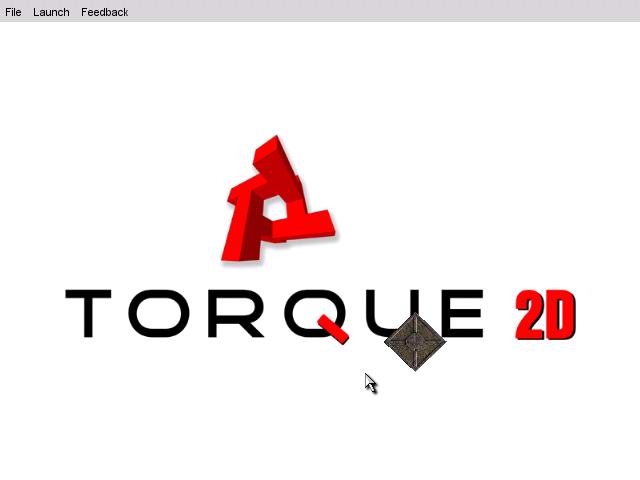
Sweet! If yours doesn't work, compare your moveTo.cs to this:
function moveToDemo()
{
        $player = new t2dStaticSprite() { scenegraph = t2dScene; };
        $player.setPosition("0 0");
        $player.setSize( "7 7" );
        $player.setImageMap( tileMapImageMap );
}

function t2dSceneObject::setDestination(%this, %dest)
{
        if((%dest != 0) && (%dest !$= ""))
        {
                %this.Destination = %dest;
                %this.isMoving = true;
                if($debugMsg::pathDebug)
                        echo("calling move to dest with" SPC %dest);
                %this.schedule(50,moveToDest);
        }
}

function angleBetween(%playerPos, %mousePos)
{
        // Seperate Mouse Position
        %mxpos = getWord(%mousePos,0);
        %mypos = getWord(%mousePos,1);

        // Seperate Player Position
        %px = getWord(%playerPos,0);
        %py = getWord(%playerPos,1);

        // Calculate Angle from player to mouse (convert to degrees).
        %angle = mRadToDeg( mAtan( %mxpos-%px, %py-%mypos ) );

        return %angle;
}

function t2dSceneObject::moveToDest(%this)
{
        if(%this.isMoving)
        {
                %direc = angleBetween(%this.getPosition(), %this.Destination);
                %this.destRot = %direc;
                %this.setRotation(%direc);
                %this.setLinearVelocityPolar(%direc, %this.speed);

                %this.schedule(100, checkDest);
        }
}

function distBetween(%loc1, %loc2)
{
        %x1 = getWord(%loc1, 0);
        %y1 = getWord(%loc1, 1);

        %x2 = getWord(%loc2, 0);
        %y2 = getWord(%loc2, 1);

        %xd = %x2 - %x1;
        %yd = %y2 - %y1;

        return mSqrt((mPow(%xd,2)) + (mPow(%yd,2)));
}

function t2dSceneObject::checkDest(%this)
{
        if(%this.isMoving)
        {
                %space = 0.5;
                %distance = distBetween(%this.getPosition(), %this.Destination);

                if(%distance < %space)
                {
                        %this.setAtRest();
                        %this.isMoving = false;
                        %this.onReachDestination();
                } else
                {
                        %direc = angleBetween(%this.getPosition(), %this.Destination);

                        if(%direc != %this.destRot)
                        {
                                %this.destRot = %direc;
                                %this.setRotation(%direc);
                                %this.setLinearVelocityPolar(%direc, %this.speed);
                        }
                        %this.schedule(100, checkDest);
                }
        }
}
So now everything works, but you might be asking yourself why this tutorial was entitled "A 'moveTo' Function" if we aren't going to make a moveTo function. Okay, okay... let's get to that. Add this to the end of moveTo.cs:
function t2dSceneObject::moveTo(%this, %dest, %speed)
{
        %this.speed = %speed;
        %this.setDestination(%dest);
}
Now we can just open the console and call:
$player.moveTo("15 15", 10);
Instead of setting the speed and destination by hand every time. Save your file and test it out. You should get the same result as when you tested it last time, but now we're using our actual moveTo function.
Let's add one last cool feature before we finish. Put this function at the bottom of moveTo.cs:
function sceneWindow2D::onRightMouseDown( %this, %mod, %worldPos, %mouseClicks )
{
        $player.moveTo(%worldPos, 10);
}
Now save and fire up T2D. Right click where you want to move, and voila! So, now we can right click and move the player (okay, so it's just a box). We've got a starting point for some basic movement! Good work!
Here is the final moveTo.cs file:
function moveToDemo()
{
        $player = new t2dStaticSprite() { scenegraph = t2dScene; };
        $player.setPosition("0 0");
        $player.setSize( "7 7" );
        $player.setImageMap( tileMapImageMap );
}

function t2dSceneObject::setDestination(%this, %dest)
{
        if((%dest != 0) && (%dest !$= ""))
        {
                %this.Destination = %dest;
                %this.isMoving = true;
                if($debugMsg::pathDebug)
                        echo("calling move to dest with" SPC %dest);
                %this.schedule(50,moveToDest);
        }
}

function angleBetween(%playerPos, %mousePos)
{
        // Seperate Mouse Position
        %mxpos = getWord(%mousePos,0);
        %mypos = getWord(%mousePos,1);

        // Seperate Player Position
        %px = getWord(%playerPos,0);
        %py = getWord(%playerPos,1);

        // Calculate Angle from player to mouse (convert to degrees).
        %angle = mRadToDeg( mAtan( %mxpos-%px, %py-%mypos ) );

        return %angle;
}

function t2dSceneObject::moveToDest(%this)
{
        if(%this.isMoving)
        {
                %direc = angleBetween(%this.getPosition(), %this.Destination);
                %this.destRot = %direc;
                %this.setRotation(%direc);
                %this.setLinearVelocityPolar(%direc, %this.speed);

                %this.schedule(100, checkDest);
        }
}

function distBetween(%loc1, %loc2)
{
        %x1 = getWord(%loc1, 0);
        %y1 = getWord(%loc1, 1);

        %x2 = getWord(%loc2, 0);
        %y2 = getWord(%loc2, 1);

        %xd = %x2 - %x1;
        %yd = %y2 - %y1;

        return mSqrt((mPow(%xd,2)) + (mPow(%yd,2)));
}

function t2dSceneObject::checkDest(%this)
{
        if(%this.isMoving)
        {
                %space = 0.5;
                %distance = distBetween(%this.getPosition(), %this.Destination);

                if(%distance < %space)
                {
                        %this.setAtRest();
                        %this.isMoving = false;
                        %this.onReachDestination();
                } else
                {
                        %direc = angleBetween(%this.getPosition(), %this.Destination);

                        if(%direc != %this.destRot)
                        {
                                %this.destRot = %direc;
                                %this.setRotation(%direc);
                                %this.setLinearVelocityPolar(%direc, %this.speed);
                        }
                        %this.schedule(100, checkDest);
                }
        }
}

function t2dSceneObject::moveTo(%this, %dest, %speed)
{
        %this.speed = %speed;
        %this.setDestination(%dest);
}
function sceneWindow2D::onRightMouseDown( %this, %mod, %worldPos, %mouseClicks )
{
        $player.moveTo(%worldPos, 10);
}
|





