



Image:Exporter.jpg
From TDN
| Orientation | Normal |
|---|---|
| Horizontal resolution | 72 dpi |
| Vertical resolution | 72 dpi |
| Software used | Adobe Photoshop CS Windows |
| File change date and time | 10:41, 28 June 2005 |
| Color space | sRGB |
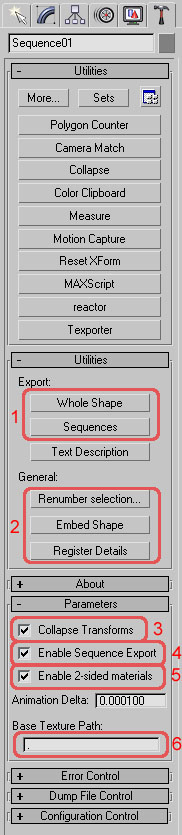
1 - Whole Shape exports dts. Sequences exports dsq.
2 - Hierarchy setup tools. Renumber selection brings up a dialog when clicked. Enter a number and click ok to remove any trailing numbers and replace with the one entered for all selected meshes. Embed shape sets up a simple hierarchy for currently selected meshes. Register Details creates markers for an existing hierarchy.
3 - If unchecked, the exporter will not cull any nodes out. Its typically better to use a .cfg file to control node culling instead though.
4 - If you want to export a dts without any of the sequences setup exporting also, uncheck Enable Sequence Export.
5 - Enable/Disable 2 sided material support. Generally just leave it turned on and use material settings to enable/disable 2 sided materials.
6 - Specifies the texture path for torque to look for textures for the dts. By default its set to the same directory as the dts.
File history
Legend: (cur) = this is the current file, (del) = delete
this old version, (rev) = revert to this old version.
Click on date to see the file uploaded on that date.
- (del) (cur) 16:54, 29 June 2005 . . Chemeleon (73243 bytes) (1 - Whole Shape exports dts. Sequences exports dsq. 2 - Hierarchy setup tools. Renumber selection brings up a dialog when clicked. Enter a number and click ok to remove any trailing numbers and replace with the one entered for all selected me)
- Edit this file using an external applicationSee the setup instructions for more information.
Links
The following pages link to this file:


